Browser Extension for Static Web Hosting
The official HTMLSave chrome browser extension. Host HTML, CSS, JS, and JSON files online in one click directly from your browser toolbar or Sidepanel.


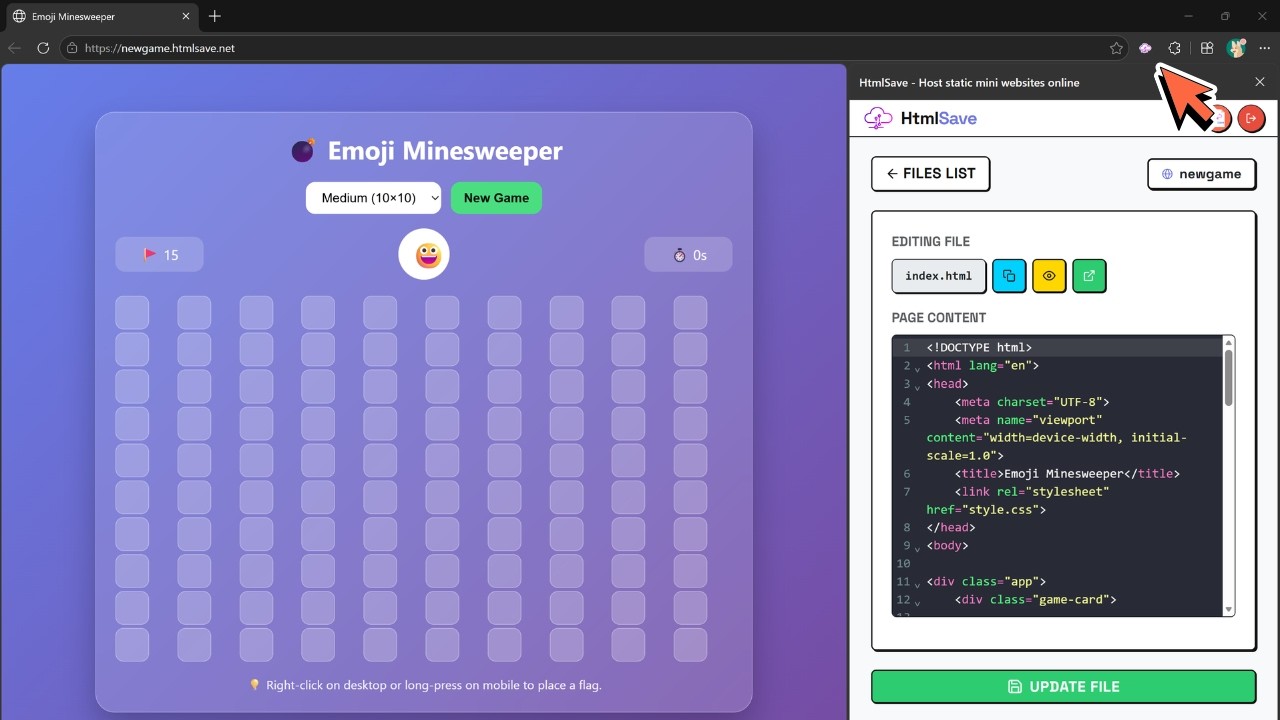
Deploys directly from your Side Panel
Drag and drop files, edit code in real-time, and share live URLs without ever navigating away from your active tab. Perfect for working side-by-side with AI chat assistants like ChatGPT, Claude, or Gemini.
Open Sidepanel or Toolbar
Access the entire HTMLSave workspace from any tab. Pin it for ultra-fast access.
Write, Edit, or Drag Files
Paste raw HTML/JSON directly or drag in local assets. The built-in editor validates code on the fly.
Deploy Instantly & Share
Your files go live immediately on a secure subdomain. Copy the URL or check live view stats in real-time.


Why Use the HTMLSave Browser Extension?
Skip the backend setups, repository pushes, or even loading the web dashboard. Manage your static pages instantly.
Instant Installation
Install the extension from the store in seconds. Ready to use immediately with zero setup required.
AI Side-by-Side Workflow
Copy code from AI assistants in any tab and paste it directly into your side panel extension to host it instantly.
Inline Editor
Write, test, and tweak your HTML, CSS, or JSON directly inside the extension toolbar popup.
Live Analytics Tracking
Keep an eye on how many visits your pages receive directly from the extension UI listings.
Multi-Format Deploys
Host everything from standard `.html` files, stylesheet overrides, mock APIs, to simple `.json` config maps.
Clipboard Shortcuts
Copy live URLs, edit raw code files, or open pages instantly with one-click action shortcuts.
The Ultimate Companion for AI Code Generation
Working with ChatGPT, Claude, Gemini, or Grok? Keep HTMLSave docked in your browser side panel to copy code outputs and host them immediately for live deployment testing.
Instant Deployment Testing
Watch how it works
See how to host mini sites on HTMLSave with the help of our official browser extension.
Install on Your Preferred Browser
Compatible with major browsers. Get started instantly.
Start Hosting Directly from Your Toolbar
Join developers who rely on HTMLSave for instant static hosting and rapid playground deployments.